DTF Printer Maintenance – Complete Guide for Long-Lasting Performance
- wedoseo01
- Apr 4
- 18 min read

In the dynamic world of garment decoration, Direct-to-Film (DTF) printing has emerged as a revolutionary technology, offering vibrant, durable, and versatile prints on a wide array of fabrics. However, the longevity and consistent quality of your DTF prints, and indeed your entire printing operation, hinge critically on one often-overlooked aspect: DTF printer maintenance. Neglecting proper care can lead to a cascade of issues, from frustrating print quality degradation and costly downtime to premature equipment failure. This comprehensive guide is designed to equip both beginners and seasoned business owners with the essential knowledge and actionable strategies to ensure their DTF printer operates at peak performance, safeguarding their investment and maximizing profitability. We will delve into what maintenance a DTF printer needs, how to prevent common problems like ink drying, and provide expert tips to extend your printer's lifespan.
What Maintenance Does a DTF Printer Need?
Understanding what maintenance a DTF printer needs is the first step towards a successful and trouble-free printing experience. DTF printers, with their intricate ink delivery systems and sensitive printheads, require a multi-tiered maintenance approach that includes daily, weekly, and monthly routines. These routines are not merely suggestions but critical practices that prevent common issues and ensure consistent output quality.
Daily Maintenance
Daily maintenance is your first line of defense against common DTF printer problems. These quick checks and cleanings are crucial for preventing ink clogs and ensuring smooth operation.
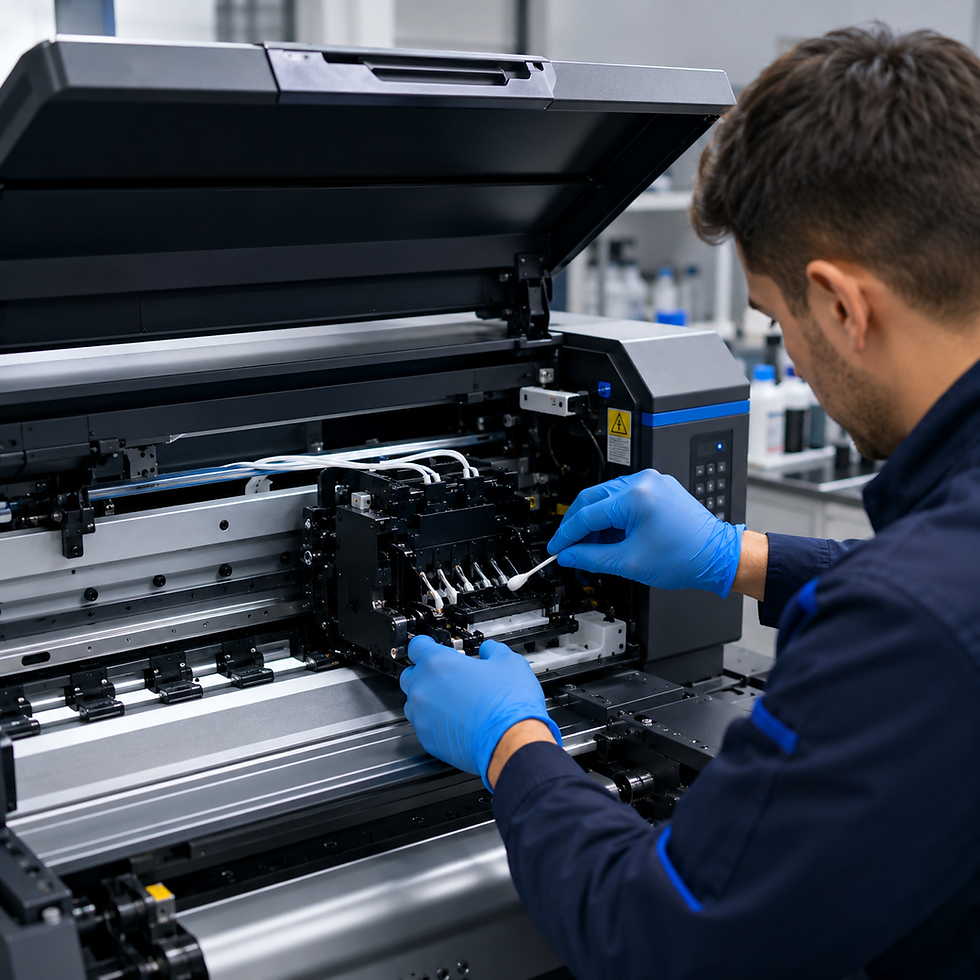
Printhead Wiping: Gently wipe the bottom of the printhead with a lint-free swab moistened with cleaning solution. This removes any accumulated ink or debris that could cause nozzle clogs or print defects.
Capping Station Cleaning: Ensure the capping station, where the printhead rests when not in use, is clean and moist. A dry or dirty capping station can lead to printhead drying out and clogging.
Wiper Blade Inspection: Check the wiper blade for any damage or excessive ink buildup. A clean and functional wiper blade is essential for properly cleaning the printhead.
Ink Level Check: Verify that all ink tanks have sufficient ink levels. Running out of ink can introduce air into the ink lines, leading to printing issues and requiring extensive purging.
Shake White Ink: Gently shake the white ink tank daily to prevent pigment settling, which can lead to white ink separation and clogging.
Weekly Maintenance
Weekly maintenance routines delve deeper into the printer's components, addressing areas that accumulate ink and debris over a longer period.
Damper and Ink Line Inspection: Check dampers and ink lines for any signs of air bubbles, leaks, or blockages. Address any issues promptly to maintain consistent ink flow.
Encoder Strip Cleaning: Carefully clean the encoder strip with a lint-free cloth and cleaning solution. A dirty encoder strip can cause inaccurate printhead movement and banding.
Waste Ink Tank Check: Monitor the waste ink tank and empty it before it becomes full. Overfilling can lead to spills and potential damage to electronic components.
Printhead Nozzle Check: Perform a nozzle check pattern to identify any clogged nozzles. If clogs are present, run a head cleaning cycle to clear them.
Monthly Maintenance
Monthly maintenance involves more thorough cleaning and inspection, often requiring a bit more time but significantly contributing to the DTF printer's lifespan and reliability.
Deep Printhead Cleaning: Execute a more intensive printhead cleaning cycle, often involving flushing cleaning solution through the printhead. Consult your printer's manual for specific instructions.
Lubrication of Moving Parts: Apply a small amount of appropriate lubricant to the printer's moving parts, such as the guide rails, to ensure smooth and quiet operation.
Firmware Updates: Check for and install any available firmware updates for your DTF printer. Updates often include performance enhancements and bug fixes.
How to Keep a DTF Printer from Drying Out
One of the most persistent challenges in DTF printing is preventing ink from drying out, especially the white ink, which is prone to settling and clogging. Understanding how to keep a DTF printer from drying out is paramount for uninterrupted production and printhead longevity.
Ink Circulation Tips
Effective ink circulation is vital to prevent pigment settling and drying within the ink lines and printhead.
Automated Circulation Systems: Many modern DTF printers come equipped with automated white ink circulation systems. Ensure these systems are functioning correctly and are activated according to the manufacturer's recommendations.
Manual Shaking: For printers without automated circulation, manually shaking the white ink tank daily is crucial. This redistributes pigments and prevents them from settling at the bottom.
Regular Printing: The most effective way to keep ink flowing is to use the printer regularly. Even small prints or nozzle checks can help maintain ink circulation.
Proper Storage
When the printer is not in use, proper storage conditions play a significant role in preventing ink drying.
Capping Station Seal: Ensure the printhead is properly seated on the capping station when the printer is idle. The capping station creates an airtight seal that prevents air exposure to the nozzles.
Printer Cover: If your printer comes with a cover, use it to protect the printer from dust and environmental factors that can accelerate ink drying.
Humidity Control
Environmental factors, particularly humidity, have a profound impact on ink drying. Maintaining optimal humidity levels in your printing environment is critical.
Humidifiers/Dehumidifiers: Depending on your climate, you may need to use a humidifier to increase moisture or a dehumidifier to reduce it. The ideal humidity range for most DTF inks is between 40% and 60%.
Consistent Environment: Avoid drastic fluctuations in temperature and humidity, as these can stress the ink and printhead, leading to drying and clogging.
Usage Frequency
Consistent usage is a natural deterrent to ink drying. If your printer sits idle for extended periods, the risk of ink drying significantly increases.
Scheduled Prints: If you don't have daily print jobs, consider scheduling small test prints or nozzle checks every day or two. This keeps the ink flowing and prevents stagnation.
Power On/Off Cycles: Some printers perform mini-cleaning cycles upon startup or shutdown. Consult your manual to understand if this feature can be leveraged to your advantage.
Common DTF Printer Problems and Solutions
Even with diligent maintenance, DTF printers can encounter issues. Understanding DTF printer problems and solutions is key to quickly diagnosing and resolving them, minimizing downtime and frustration.
Clogged Printheads
Problem: Clogged printheads are perhaps the most common and frustrating issue for DTF printer users, often manifesting as missing lines, streaks, or faded colors in prints.
Solution:
Nozzle Check and Head Cleaning: Start with a nozzle check to identify the clogged nozzles. Then, perform a standard head cleaning cycle through your printer's utility software. Repeat if necessary.
Printhead Soaking: For stubborn clogs, a printhead soaking procedure might be required. This involves carefully removing the printhead (if accessible and recommended by the manufacturer) and soaking its bottom in a specialized printhead cleaning solution. Always follow manufacturer guidelines precisely.
Ink Flush: In severe cases, an ink flush, where cleaning solution is run through the ink lines and printhead, may be needed. This is typically a more involved process and might require professional assistance.
Ink Drying
Problem: Ink drying within the ink lines or printhead, leading to clogs and inconsistent ink flow.
Solution:
Implement Prevention Strategies: Revisit the prevention strategies discussed in the "How to Keep a DTF Printer from Drying Out" section, focusing on ink circulation, proper storage, humidity control, and regular usage.
Cleaning Solution: Use a dedicated DTF cleaning solution to dissolve dried ink. Never use water or other solvents not approved by the printer manufacturer.
Banding Issues
Problem: Horizontal lines or streaks appearing across prints, often indicating inconsistent ink delivery or printhead issues.
Solution:
Nozzle Check: Perform a nozzle check to identify any clogged nozzles, which are a common cause of banding. Clean the printhead if necessary.
Encoder Strip Cleaning: A dirty or scratched encoder strip can lead to inaccurate printhead positioning, causing banding. Clean the encoder strip carefully.
Printhead Alignment: Recalibrate the printhead alignment through your printer’s utility software. Misalignment can cause overlapping or gaps in print passes.
Media Feed Adjustment: Ensure the film is feeding smoothly and consistently through the printer. Uneven feeding can also contribute to banding.
Poor Adhesion
Problem: The DTF print does not adhere properly to the garment, leading to peeling or cracking.
Solution:
Powder Application: Ensure an even and sufficient application of DTF adhesive powder. Insufficient powder will result in poor adhesion.
Curing Temperature and Time: Verify that the curing temperature and time are correct for the specific film and powder being used. Under-curing is a common cause of poor adhesion.
Pressure: Apply adequate pressure during the heat press process. Insufficient pressure can prevent the adhesive from bonding properly with the fabric.
Film Quality: Use high-quality DTF film. Subpar film may not release the print effectively or may have inconsistent adhesive properties.
Are DTF Printers Difficult to Maintain?
The question of are DTF printers difficult to maintain often arises, especially for newcomers to the garment printing industry. The honest answer is that DTF printers require consistent attention and adherence to maintenance protocols, but they are not inherently difficult to maintain once a routine is established.
Honest Answer (Balanced View)
DTF printers are more complex than traditional inkjet printers due to their specialized inks (especially white ink) and the need for precise powder application and curing. This complexity translates into a higher demand for regular maintenance compared to some other printing technologies. However, with proper training and a disciplined approach, the maintenance tasks are manageable and become second nature.
Beginner vs Professional Perspective
Beginner: For beginners, the initial learning curve for DTF printer maintenance can seem steep. There are many steps, and the consequences of neglecting maintenance can be costly. However, by following manufacturer guidelines and seeking out reliable resources, beginners can quickly become proficient.
Professional: Experienced DTF printer operators often find maintenance to be a routine part of their daily workflow. They understand the importance of preventative measures and can quickly diagnose and resolve minor issues, minimizing downtime.
Ultimately, the perceived difficulty of DTF printer maintenance is largely dependent on one's commitment to learning and implementing the necessary routines. It's an investment of time that pays off significantly in terms of printer longevity, print quality, and operational efficiency.
How Often Should You Clean a DTF Print Head?
The frequency of printhead cleaning is a critical aspect of DTF printer maintenance, directly impacting print quality and printhead lifespan. Understanding how often should you clean a DTF print head is essential for optimal performance.
Recommended Cleaning Schedule
Daily: A light cleaning of the printhead surface and capping station should be performed daily, especially if the printer has been used. This prevents fresh ink from drying and accumulating.
After Extended Idleness: If the printer has been idle for more than 24-48 hours, a nozzle check and a light cleaning cycle are recommended before starting new print jobs.
As Needed (Based on Nozzle Checks): The most reliable indicator for printhead cleaning is the nozzle check pattern. If the nozzle check reveals missing lines or deflections, a cleaning cycle is immediately warranted.
Signs When Cleaning is Needed
Beyond the scheduled cleanings, several signs indicate that your DTF printhead requires attention:
Print Quality Degradation: Noticeable banding, streaking, or faded colors in your prints are strong indicators of clogged or partially clogged nozzles.
Missing Nozzles: A nozzle check pattern showing gaps or missing lines directly points to clogged nozzles.
Ink Droplets on Printhead: Visible ink droplets or residue on the printhead surface suggest a need for cleaning.
Error Messages: Some advanced DTF printers may display error messages related to printhead issues, prompting a cleaning or inspection.
Regular and responsive printhead cleaning is a cornerstone of effective DTF printer maintenance, ensuring consistent print quality and extending the life of this vital component.
How to Clean a DTF Printhead (Step-by-Step)
Cleaning a DTF printhead effectively and safely is crucial to prevent damage and ensure optimal performance. This step-by-step guide on how to clean a DTF printhead will walk you through the process.
Safe Cleaning Process
Disclaimer: Always refer to your specific DTF printer's user manual for detailed cleaning instructions. The following is a general guide and may need to be adapted based on your printer model.
Power Off and Unplug: Before any manual cleaning, always power off your printer and unplug it from the power source to prevent accidental damage or injury.
Access the Printhead: Carefully open the printer's cover to access the printhead assembly. Some printers may require moving the printhead carriage manually to a service position.
Prepare Cleaning Solution: Use only manufacturer-approved DTF printhead cleaning solution. Never use water, alcohol, or other harsh chemicals, as these can damage the delicate printhead components.
Gentle Wiping (Surface Cleaning):
Moisten a lint-free swab or cleaning wipe with the cleaning solution.
Gently wipe the bottom surface of the printhead, removing any visible ink residue or debris. Avoid applying excessive pressure.
Clean around the nozzles, but do not directly scrub the nozzle plate.
Capping Station and Wiper Blade: Clean the capping station and wiper blade thoroughly with a cleaning solution-moistened swab. Ensure no dried ink is left behind.
Flushing (If Recommended): Some manufacturers recommend flushing cleaning solution through the printhead using a syringe or specialized cleaning cartridge. This is typically for more stubborn clogs. Only perform this if explicitly instructed by your printer's manual or a qualified technician.
Reassemble and Test: Once cleaning is complete, reassemble the printer, plug it back in, and power it on. Perform a nozzle check to verify that the clogs have been cleared and print quality has improved.
Tools Needed
Lint-free swabs or cleaning wipes
DTF printhead cleaning solution (manufacturer-approved)
Small syringe (if flushing is recommended by manufacturer)
Gloves (to protect your hands from ink and cleaning solution)
Mistakes to Avoid
Using Non-Approved Solutions: This is the most critical mistake. Using the wrong chemicals can permanently damage your printhead.
Excessive Force: Never scrub the printhead nozzles or apply excessive force, as this can scratch or misalign them.
Ignoring Manufacturer Guidelines: Always prioritize your printer's specific manual instructions over general advice.
Leaving Printer Unattended After Cleaning: Always perform a nozzle check and test print after cleaning to ensure everything is functioning correctly.
How Much Does It Cost to Maintain a DTF Printer?
Understanding the financial implications of owning a DTF printer goes beyond the initial purchase price. The question of how much does it cost to maintain a DTF printer encompasses various ongoing expenses that are crucial for budgeting and profitability.
Ink Costs
Ink is typically the largest recurring expense in DTF printing. The cost varies significantly based on ink type (CMYK and white), brand, and volume purchased.
White Ink: White ink, due to its higher pigment content and tendency to settle, is often consumed more rapidly and can be more expensive than CMYK inks. It also requires more frequent circulation and maintenance.
CMYK Inks: While generally less expensive per liter than white ink, CMYK inks are still a significant ongoing cost, especially for high-volume printing.
Cleaning Supplies
Regular maintenance requires a steady supply of cleaning solutions and materials.
Printhead Cleaning Solution: Essential for daily and weekly maintenance, and for addressing clogs.
Lint-free Swabs/Wipes: Used for wiping printheads, capping stations, and other components.
Gloves: For personal protection during cleaning.
Replacement Parts
Over time, certain components of a DTF printer are subject to wear and tear and will need replacement.
Printheads: The most expensive consumable part. While proper maintenance extends their life, printheads will eventually need replacement due to wear or irreparable clogs.
Dampers: Small filters that regulate ink flow to the printhead. They can clog over time and need periodic replacement.
Wiper Blades: These rubber blades clean the printhead surface and wear out with use.
Capping Stations: The rubber seals in the capping station can degrade, affecting its ability to create an airtight seal.
Monthly Estimated Cost
Category | Estimated Monthly Cost (USD) |
Inks (CMYK + White) | $100 - $500+ |
Cleaning Supplies | $20 - $50 |
Replacement Parts | $50 - $200 (amortized) |
Total Estimated | $170 - $750+ |
Note: These are rough estimates and can vary widely based on printer model, usage volume, ink brands, and regional pricing.
Investing in quality inks and adhering to a strict maintenance schedule can help optimize these costs by extending the life of consumables and preventing costly repairs.
DTF Printer Lifespan – How Long Do They Last?
The longevity of your DTF printer is a significant factor in your return on investment. The question of DTF printer lifespan – how long do they last? depends on several key components and how well they are maintained.
Printhead Lifespan
Critical Component: The printhead is the heart of a DTF printer and often the most delicate and expensive component. Its lifespan is highly dependent on maintenance.
Expected Lifespan: With diligent daily and weekly maintenance, a DTF printhead can last anywhere from 6 months to 2 years or more. Neglect, however, can drastically reduce this to just a few weeks or months.
Factors Affecting: Ink quality, cleaning frequency, environmental conditions (humidity, temperature), and usage patterns all play a role.
Machine Lifespan
Overall Durability: The overall machine, excluding consumables like printheads, is generally built to last longer. The mechanical and electronic components can function for 3 to 5 years or even longer with proper care.
Wear and Tear: Moving parts, such as motors, belts, and rollers, will eventually show wear. Regular lubrication and timely replacement of worn parts can extend the machine's life.
Factors Affecting Longevity
Maintenance Regimen: This is the single most important factor. Consistent and correct maintenance prevents premature wear and failure.
Ink Quality: Using high-quality, compatible DTF inks prevents clogs and reduces strain on the printhead and ink delivery system.
Environmental Control: Stable temperature and humidity levels reduce stress on inks and components.
Usage Volume: Printers used for high-volume production will naturally experience more wear than those used intermittently. However, consistent usage is better than prolonged idleness.
Manufacturer and Model: Higher-end, industrial-grade DTF printers are often built with more robust components and designed for longer lifespans than entry-level models.
By prioritizing preventative maintenance and investing in quality supplies, you can significantly extend the lifespan of your DTF printer, ensuring a greater return on your investment.
How to Make DTF Prints Last Longer
The durability of DTF prints is a major selling point, but achieving long-lasting results requires attention to detail beyond the printing process itself. Understanding how to make DTF prints last longer involves proper curing, washing instructions, and consideration of fabric types.
Proper Curing
Curing is the process where the adhesive powder melts and bonds the ink to the film, and subsequently, to the garment. It is a critical step for print durability.
Temperature and Time: Adhere strictly to the recommended curing temperature and time for your specific DTF film and adhesive powder. Under-curing leads to poor adhesion, while over-curing can damage the film or garment.
Even Heat Distribution: Ensure your heat press provides even heat and pressure across the entire print area. Cold spots or uneven pressure can result in inconsistent curing and reduced durability.
Peel Method: Follow the recommended peel method (hot peel, warm peel, or cold peel) for your DTF film. Peeling too early or too late can affect adhesion.
Washing Instructions
Providing clear and correct washing instructions to your customers is paramount for the longevity of DTF prints. Educating them on proper garment care will significantly extend the life of their custom apparel.
Wash Inside Out: Always recommend washing garments inside out. This protects the printed design from abrasion during the wash cycle.
Cold Water: Advise washing in cold water. Hot water can weaken the adhesive bond over time.
Gentle Cycle: Suggest using a gentle wash cycle to minimize stress on the print.
Mild Detergent: Recommend using a mild detergent and avoiding harsh chemicals, bleach, or fabric softeners, which can degrade the print.
Tumble Dry Low or Hang Dry: For drying, tumble dry on a low heat setting or, ideally, hang dry. High heat from dryers is a common culprit for print degradation.
No Ironing Directly on Print: Instruct customers never to iron directly on the printed area. If ironing is necessary, turn the garment inside out.
Fabric Considerations
The type of fabric can also influence the longevity of a DTF print.
Cotton and Blends: DTF prints generally adhere very well to cotton and cotton-blend fabrics, offering excellent durability.
Polyester: While DTF works on polyester, care must be taken with heat press settings to avoid scorching the fabric or causing dye migration. Prints on polyester can be durable but may require specific curing parameters.
Fabric Surface: Smooth, tightly woven fabrics generally provide a better surface for adhesion than heavily textured or loosely woven materials.
By meticulously following these guidelines, you can ensure that your DTF prints not only look fantastic but also stand the test of time, enhancing customer satisfaction and your brand's reputation.
Common DTF Maintenance Mistakes to Avoid
Even with the best intentions, certain practices can inadvertently undermine your DTF printer's performance and lifespan. Being aware of common DTF maintenance mistakes to avoid is as important as knowing what to do.
Not Cleaning Regularly
The Biggest Culprit: Skipping daily or weekly cleaning routines is the most frequent and damaging mistake. Dried ink and debris quickly accumulate, leading to clogs and printhead damage.
Consequences: Reduced print quality, frequent nozzle clogs, costly printhead replacements, and significant downtime.
Using Wrong Ink
Incompatibility Issues: Using non-compatible or low-quality DTF inks can lead to a host of problems, including inconsistent color, poor adhesion, and severe printhead clogging.
Consequences: Voided warranties, permanent printhead damage, and unsatisfactory print results.
Ignoring Humidity
Environmental Neglect: Failing to control the humidity in your printing environment is a common oversight. Both excessively dry and overly humid conditions are detrimental.
Consequences: Dry conditions accelerate ink drying and printhead clogs, while high humidity can affect powder adhesion and curing.
Overusing or Underusing Printer
Finding the Balance: Both extreme usage patterns can be harmful. Overusing without adequate maintenance causes accelerated wear, while underusing leads to ink stagnation.
Consequences: For overuse, premature component failure. For underuse, severe ink drying and clogging, requiring extensive cleaning or replacement.
Neglecting Manufacturer Guidelines
Ignoring the Experts: Every DTF printer model has specific maintenance recommendations from its manufacturer. Disregarding these guidelines can lead to issues not covered by warranty.
Consequences: Suboptimal performance, increased risk of damage, and potential voiding of warranty.
Using Abrasive Materials for Cleaning
Delicate Components: Printheads and other internal components are highly delicate. Using paper towels, rough cloths, or harsh brushes can cause irreversible damage.
Consequences: Scratched printhead nozzles, damaged sensors, and costly repairs.
By actively avoiding these common pitfalls, you can significantly improve the reliability and longevity of your DTF printer, ensuring a smoother and more profitable operation.
Expert Tips to Extend Your DTF Printer Life
Beyond the standard maintenance routines, there are several expert tips to extend your DTF printer life that can further enhance its performance, reliability, and longevity. These pro-level insights can make a significant difference in your long-term printing success.
Pro-Level Maintenance Tips
Dedicated Cleaning Station: Set up a dedicated, clean area for performing maintenance tasks. This minimizes contamination and ensures you have all necessary supplies readily available.
Maintain a Maintenance Log: Keep a detailed log of all maintenance performed, including dates, tasks, and any issues encountered. This helps track patterns, anticipate needs, and provides valuable data for troubleshooting.
Invest in Quality Consumables: While it might be tempting to opt for cheaper inks or films, investing in high-quality, manufacturer-recommended consumables pays off in the long run by preventing clogs, improving print quality, and extending component life.
Regular Software Updates: Keep your printer's firmware and software drivers updated. Manufacturers often release updates that improve performance, add features, and address known issues.
Understand Your Printer's Diagnostics: Familiarize yourself with your printer's diagnostic tools and error codes. Being able to quickly interpret these can save significant troubleshooting time.
Workflow Improvements
Batch Printing: Optimize your print jobs by batching similar designs or colors together. This reduces the frequency of color changes and associated cleaning, minimizing ink waste and wear.
Proper Shutdown Procedures: Always follow the manufacturer's recommended shutdown procedure. This often involves parking the printhead in its capping station, which is crucial for preventing ink drying.
Operator Training: Ensure all operators are thoroughly trained on proper printer operation and maintenance. A well-informed team is your best asset in preventing issues.
Environmental Monitoring: Use a hygrometer and thermometer to continuously monitor the temperature and humidity in your printing area. Adjust as needed to maintain optimal conditions.
By integrating these expert tips into your daily operations, you can transform your DTF printer from a mere machine into a highly reliable and long-lasting workhorse, maximizing its potential and your business's profitability.
DTF vs Sublimation – Which Lasts Longer?
When considering garment decoration technologies, the question of durability often arises, particularly in the comparison between DTF (Direct-to-Film) and sublimation printing. Understanding DTF vs Sublimation – which lasts longer? can help businesses choose the right method for their specific needs and inform customers about product longevity.
Quick Comparison (Tie-in with your other article)
Feature | DTF Printing | Sublimation Printing |
Process | Prints ink onto film, then transfers with adhesive powder and heat. | Prints dye onto transfer paper, then sublimates (turns into gas) into polyester fabric with heat. |
Fabric Types | Works on almost all fabrics (cotton, polyester, blends, dark/light). | Primarily works on polyester or polyester-coated items (light-colored). |
Feel | Slightly raised, soft feel (can vary with ink/powder). | No feel, becomes part of the fabric. |
Vibrancy | Excellent vibrancy on both light and dark fabrics. | Excellent vibrancy, especially on light polyester. |
Durability | Excellent wash durability with proper curing and care. | Exceptional wash durability, as dye is embedded in fibers. |
Maintenance | Requires regular maintenance, especially for white ink. | Generally lower maintenance for the printer itself. |
For a more in-depth exploration of sublimation printing and its applications, you can refer to our comprehensive guide on Sublimation Printing: The Ultimate Guide (example internal link).
Durability Verdict: Both DTF and sublimation offer excellent durability when executed correctly. Sublimation prints are often considered slightly more durable in terms of wash fastness because the dye becomes an integral part of the fabric fibers, making it virtually impossible to crack, peel, or fade under normal washing conditions. DTF prints, while incredibly durable, sit on top of the fabric and rely on the adhesive bond. However, with proper curing and adherence to washing instructions, DTF prints can easily match or even exceed the lifespan of the garment itself.
Is DTF Printing a Profitable Business?
The decision to invest in DTF printing often comes with the question: is DTF printing a profitable business? The answer is a resounding yes, provided that operational costs, including maintenance, are carefully managed and understood in relation to potential revenue.
Maintenance vs ROI Discussion
Preventative Maintenance as Investment: Viewing maintenance not as an expense but as an investment is crucial. Consistent maintenance prevents costly breakdowns, extends equipment life, and ensures consistent print quality, all of which directly impact profitability.
Reduced Downtime: A well-maintained printer experiences less downtime, meaning more production hours and higher output. Downtime directly translates to lost revenue.
Consistent Quality: High-quality, consistent prints lead to satisfied customers, repeat business, and positive referrals, all contributing to a stronger bottom line.
Cost vs Output
Low Barrier to Entry (Relatively): Compared to some other industrial printing methods, DTF printing has a relatively lower initial investment, making it accessible to small and medium-sized businesses.
Versatility: The ability to print on a wide range of fabrics (cotton, polyester, blends, dark, light) opens up diverse market opportunities, increasing potential sales volume.
High-Profit Margins: With efficient production and controlled costs, DTF printing can offer attractive profit margins per print, especially for custom and short-run orders.
Key to Profitability: The profitability of a DTF printing business is heavily influenced by efficient workflow, effective marketing, and, critically, a robust maintenance strategy. By minimizing unexpected costs through preventative care and maximizing output through reliable equipment, businesses can achieve a strong return on their DTF investment.
Conclusion
In the competitive landscape of garment decoration, the success and sustainability of your DTF printing operation are inextricably linked to diligent DTF printer maintenance. This guide has underscored that proper care is not merely a chore but a strategic imperative that safeguards your investment, ensures consistent print quality, and ultimately drives profitability. From daily printhead wipes to understanding the nuances of ink circulation and environmental control, every maintenance step contributes to the longevity and reliability of your equipment.
By embracing a proactive maintenance regimen, you can effectively mitigate common challenges like ink drying and clogged printheads, extend the lifespan of critical components, and produce prints that consistently impress. Remember, a well-maintained DTF printer is a productive DTF printer, leading to satisfied customers and a thriving business.
For all your DTF printing needs, including high-quality inks, films, powders, and essential cleaning solutions, visit AlphaPrintSupply.com. Equip yourself with the best to ensure your DTF journey is smooth, efficient, and exceptionally profitable.


Comments