
DTF Film Thickness Explained: Microns, Peel Types, and How to Choose Right

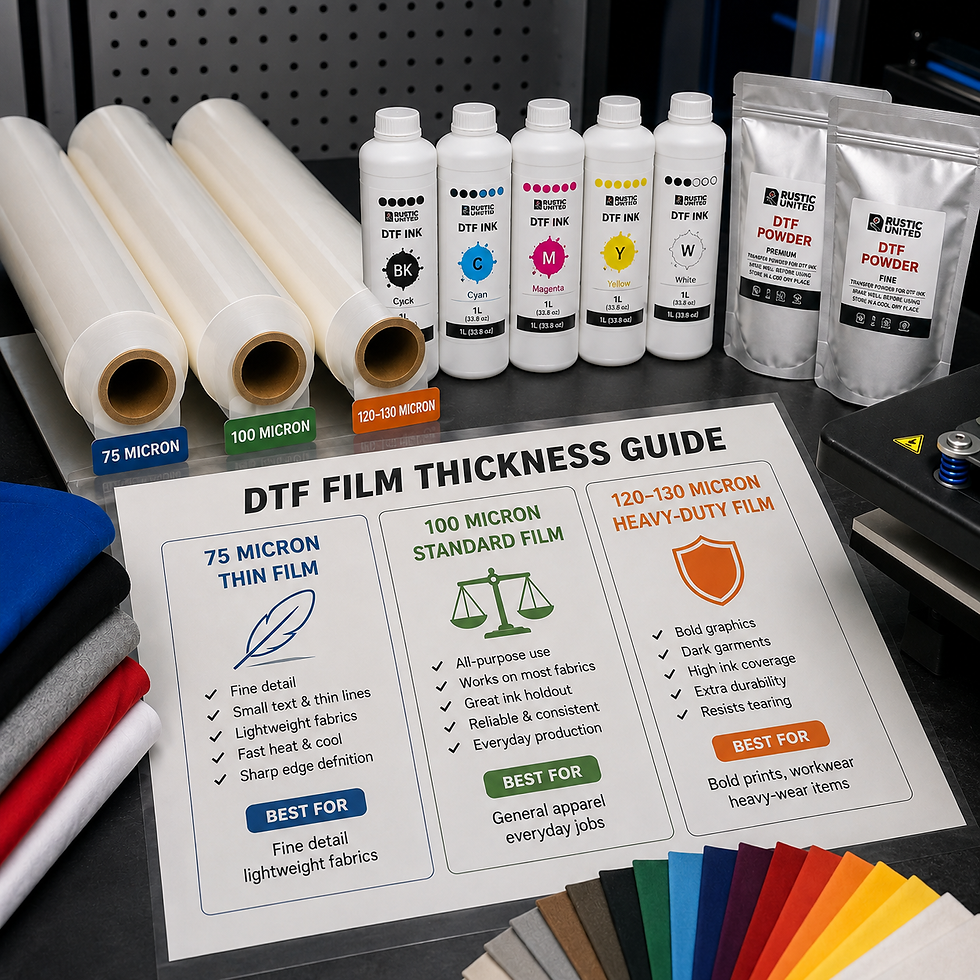
DTF transfer film thickness ranges from about 75 to 130 microns, and the number you pick directly changes your print's durability, flexibility, and how your film behaves on press. Thinner film (75 microns) suits fine detail and lightweight fabrics. Standard film (around 100 microns) handles most everyday jobs. Heavy-duty film (120 to 130 microns) holds up to bold graphics, heavy washing, and tougher substrates.
This guide breaks down what DTF film thickness means, how it affects ink adhesion and heat transfer, and how to match the right micron count to your fabric, design, and printer. You'll also get a quick quality-check checklist for every print run.
If you are looking for high quality DTF films, Alpha Print Supply offers a complete range of premium consumables to build or grow your printing business with confidence.
What DTF Film Thickness Means?
DTF (Direct-to-Film) transfer film is a PET-based carrier sheet. Your printer lays ink onto the film, powder adhesive bonds to the ink, and heat presses the finished design onto the garment. Its thickness shapes almost everything downstream, from how crisp your lines look to how many washes your customer's shirt survives.
Print shops that treat film as an afterthought usually run into curling, cracking, or inconsistent color. Film thickness is a production variable, the same way ink viscosity or press temperature is.
Why Film Thickness Matters in DTF Printing
Thickness controls three things: heat transfer speed, structural stability, and ink holdout.
Heat transfer speed: thinner film heats and cools faster, shortening press time.
Structural stability: thicker film resists tearing and stretching during feeding and peeling.
Ink holdout: thicker film holds more ink without saturating through, improving color density on bold designs.
Get the thickness wrong, and you'll see it fast: cracked prints after a few washes, film that won't feed straight, or colors that look washed out on dark garments.
DTF Film Thickness Explained: The Micron Ranges
Most DTF PET film falls into three thickness tiers. Here's what each one does on press.
1. Thin Film (Around 75 Microns)
Thin film is lightweight and flexible. It's built for fine detail work: small text, thin lines, and intricate logos where sharp edge definition matters most. The reduced substrate limits ink spread, so your fine lines stay crisp instead of bleeding.
Thin film also heats and cools quickly, which speeds up production on high-volume runs. The tradeoff is handling. It's more prone to tearing or curling under tension, so it demands a steady feed and careful peeling.
2. Standard Film (Around 100 Microns)
This is the workhorse thickness, and it's what most DTF transfer film rolls default to. It balances flexibility with durability, feeds reliably through most printers, and performs consistently across ink formulations and fabric types.
If your shop prints everything from t-shirts to hoodies to tote bags, standard-thickness film is your safest default.
3. Heavy-Duty Film (120 to 130 Microns)
Heavy-duty film is built for bold graphics, solid color blocks, and substrates that take a beating. Its added thermal mass distributes heat more evenly during pressing, which reduces hot spots on large-format prints. It also resists puncture and deformation better during automated feeding.
The tradeoff is a stiffer hand-feel and slightly longer press times, since more material needs to heat through.
How Thickness Affects Print Quality and Durability
Film thickness and wash durability are directly linked. Thicker film provides a stronger mechanical bond between the ink layer and the powder adhesive, so prints resist cracking and peeling through repeated wash cycles. Shop-level wash testing typically shows heavy-duty film holding sharp edges through 40 to 50 industrial washes, while thin film starts showing minor edge softening closer to 20 to 25 washes on the same fabric.
Thickness also affects press settings. Thicker film needs a slightly longer dwell time to fully cure the adhesive layer. Thin film cures faster but gives you a narrower margin for error; overheat it slightly and you risk scorching the design.
Cold Peel vs Hot Peel: Does Thickness Play a Role?
Peel type and thickness are separate specs, but they interact. Cold peel film, the common choice for detailed multi-color designs, needs the print to fully cool before you lift the film. Hot peel film comes off immediately after pressing and suits simpler, bold graphics.
Thicker film pairs well with hot peel applications, since the extra thermal mass keeps the design stable during the immediate peel. Thin film paired with cold peel gives you the sharpest detail retention, since the design fully sets before any peeling stress.
How to Choose the Right Film Thickness for Your Shop
Match your film to the job. Use this quick reference:
Fine detail, small text, lightweight fabrics: thin film (75 microns)
General apparel, mixed order types, daily production: standard film (100 microns)
Bold graphics, dark garments, heavy-wear items, workwear: heavy-duty film (120 to 130 microns)
High-volume, fast-turnaround shops: thinner film to cut press cycle time
Shops running automated feed systems: standard to heavy-duty film for consistent tracking
If your shop runs a mix of order types, stocking two thicknesses (standard and heavy-duty) covers roughly 90% of jobs without complicating your inventory.
Quality Checks Before You Print
Before you commit to a full production run, run these checks on any new roll of DTF transfer film:
Visual inspection: Check for scratches, coating inconsistencies, or discoloration across the roll.
Adhesion test: Press a small sample, wash it, and check for lifting or peeling at the edges.
Compatibility check: Confirm the film matches your printer's ink formulation. Mismatched film and ink is the top cause of poor adhesion.
Test print: Run a small sample before a bulk job to verify color vibrancy, resolution, and cure quality.
Skipping these steps with a new film supplier is how shops end up reprinting entire orders.
Final Thoughts: The Right Film Thickness Builds Better Prints
DTF transfer film thickness isn't a minor spec sheet detail. It's a production decision that affects your press time, your wash durability, and how your finished garments feel and look. Match thin film to detail work, standard film to everyday orders, and heavy-duty film to bold graphics and heavy-use apparel, and you'll cut down on reprints and complaints.
Alpha Print Supply stocks DTF and UV DTF inks, films and powders built for consistent, reliable results across every thickness tier. Explore our complete collection of DTF printers and premium consumables to keep your business printing efficiently and delivering exceptional results.
FAQs
What is the best DTF film thickness for beginners?
Standard thickness, around 100 microns, is the safest starting point. It handles most fabric types and designs without constant press adjustments. Once you're comfortable, branch into thinner or heavier film for specific jobs.
Does thicker DTF film always mean better quality?
No. Thicker film improves durability and opacity, but it's not automatically better for every job. Fine detail work performs better on thinner film, since it limits ink spread and keeps edges sharp.
How does film thickness affect press time?
Thinner film heats and cools faster, shortening your press cycle. Thicker film needs longer dwell time so heat can fully cure the adhesive layer. Adjust your press settings to match the film you're running.
Can I use different film thicknesses on the same printer?
Yes, most DTF printers handle multiple thicknesses with proper tension and feed adjustments. Check your printer's manual for its accepted range before switching rolls to prevent feed jams and equipment wear.
How do I know if my film thickness is causing print problems?
If prints crack early, colors look weak on dark fabric, or film won't feed straight, thickness mismatch is a likely culprit. Try a different tier for the same job and compare wash results, or ask your supplier for guidance.


Comments