
Understanding Core Components of a DTF Printer: A Complete Breakdown
Updated: 2 hours ago

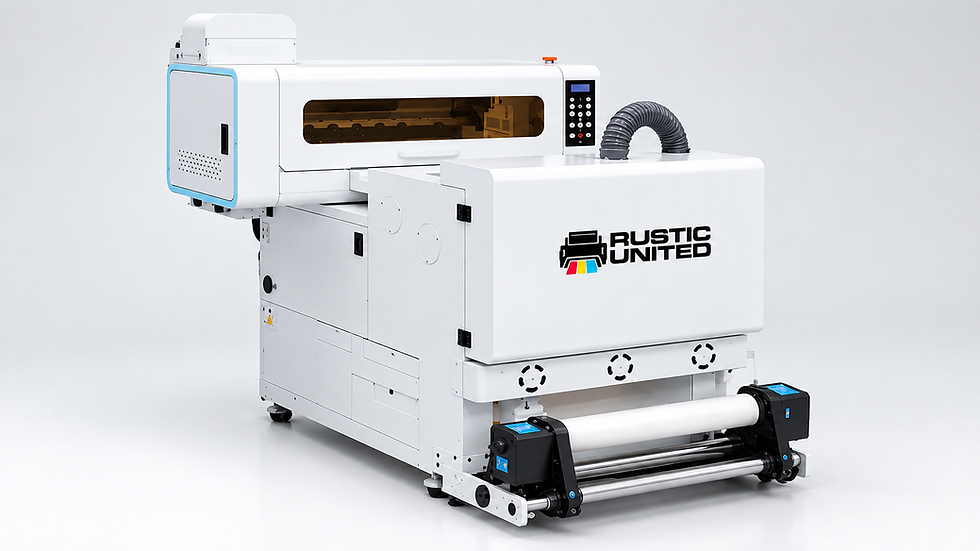
A DTF printer works by combining four core systems: a print engine (printhead and ink delivery), a software layer (mainboard and RIP software), a maintenance system (capping station and wiper blade), and a finishing line (powder, curing, and heat press). When one component underperforms, the whole job suffers, whether that shows up as banding, faded colors, or a transfer that peels after one wash. This guide breaks down every major component of a DTF printer and covers typical lifespan and common failure points, so you know what to expect and what to watch for.
Quick Reference: DTF Printer Components at a Glance
Component | Function |
Printhead | Fires microscopic ink droplets onto the film through hundreds of nozzles |
Ink delivery system | Moves ink from bottles to the printhead without air or pressure loss |
Mainboard | Receives the print file and sends real-time commands to every part |
RIP software | Converts your design into a dot-by-dot map the printer can read |
Capping station | Seals the printhead when idle to stop nozzles from drying out |
Wiper blade | Clears ink residue and debris off the printhead before each pass |
Powder shaker | Coats the wet ink with adhesive powder in an even layer |
Curing oven | Melts the powder into a smooth adhesive layer |
Heat press | Applies heat and pressure to bond the design to the fabric |
The Printhead: Real Lifespan and What Actually Kills It
The printhead is the most delicate and most important part of any DTF printer. It fires microscopic droplets of ink through hundreds of tiny nozzles, and most modern machines use piezoelectric heads that apply an electrical charge to push ink out with tight precision. Nozzle count and size determine print resolution, so a higher-quality head delivers sharper detail and more accurate color.
Printhead life varies widely with the printhead model, ink, print volume, environment and maintenance, so follow your printer manufacturer's specifications. Irregular maintenance or a dusty environment can shorten it considerably.
Most premature printhead failures trace back to two root causes: extended idle time, which lets ink dry and harden inside the nozzle channels, and white ink settling when circulation or agitation lapses.
A clogged or worn damper, the small chamber with a filter that regulates ink flow just before the head, can also starve the head of ink. Daily nozzle checks catch these problems while they're still a missing line or two, not a dead head.
Ink Delivery System: Cartridges, Dampers, and Circulation
A DTF printer needs a steady, bubble-free supply of ink reaching the printhead at all times. Interruptions here cause streaking, color shifts, and clogged nozzles.
Ink cartridges or bulk bottles: Store CMYK and white ink; commercial machines favor bulk systems since white ink consumption runs high.
Dampers: Small reservoirs between the ink lines and printhead that regulate pressure and filter out air bubbles.
Ink pumps and motors: Move ink from the bottles through the lines and control the printhead carriage and film feed.
White ink circulation system: Continuously stirs white ink to stop heavier pigments from settling and clogging the lines.
A circulation system that runs on schedule, paired with a high-pigment DTF ink built for consistency, keeps your white layer bright and your printhead protected. Alpha Print Supply carries Rustic United DTF Inks and STS Inks XPD2, both formulated for stable circulation and strong opacity on dark garments.
The Software Layer: Mainboard and RIP Software
Before ink touches film, two components handle the digital side. If the printhead is the heart, the mainboard is the brain: this circuit board receives the processed file from your RIP software and sends real-time commands to the printhead, motors, and pumps.
RIP software (Raster Image Processor) converts your design into a dot-by-dot map the printer can read. It handles color management, generates the white underbase layer automatically, and lets you control ink density and resolution. Weak color profiles in your RIP settings are a top reason two shops running identical hardware get different results from the same design file.

Maintenance Components: Capping Station and Wiper Blade
Two small components protect your most expensive part:
Capping station → seals the printhead when idle, preventing nozzles from drying out, and assists cleaning cycles by drawing excess ink through the lines.
Wiper blade → clears ink residue, dust, and fiber buildup off the printhead nozzle plate during cleaning cycles. A worn damper or capping station can also damage or starve a newly replaced printhead, so have a technician check them when a head is replaced.
The Finishing Line: Powder, Curing, and Heat Press
Printing the design is only half the job. The film still needs to become a transfer that bonds to fabric.
Once printed, the film passes through a powder shaker, which coats the wet ink with an even layer of hot-melt adhesive powder. Consistency here directly affects how well the transfer adheres; uneven coating leads to weak spots that crack or peel after a few washes. A dedicated shaker, like the 24" STS Automatic S-20 Powder Shaker from Alpha Print Supply, applies powder far more evenly than manual shaking and cuts labor time significantly.
Next, heat melts the powder into a smooth, uniform adhesive layer inside the curing oven. Temperature and dwell time both matter: undercured powder won't bond properly, and overcured powder turns brittle. Infrared and convection curing units are the two most common designs, and uniform heat distribution separates a reliable unit from an inconsistent one.
Finally, the cured transfer is placed on the garment, and the heat press applies the temperature, time and pressure the film and powder makers specify for the fabric. A press running outside that range is one of the most common causes of transfers that fail after washing.
Final Thoughts: Know Your Machine, Print With Confidence
Every reliable DTF transfer starts with a printer whose components work in harmony. Once you know what each part does and how long it should realistically last, troubleshooting stops feeling like guesswork. That knowledge saves money, reduces downtime, and protects your margins.
Ready to get started? Explore Alpha Print Supply's complete range of professional DTF printers, high-quality supplies, and expert support to find the right solution for your business.
Frequently Asked Questions
What is the most important component of a DTF printer? The printhead is widely considered the most critical part. It directly determines print resolution, color accuracy, and fine detail. Because it's also the most delicate component, regular cleaning and quality ink protect it and extend its lifespan.
Why does white ink need a circulation system? White ink contains heavier pigments that settle quickly if left still. A circulation system keeps the ink agitated so it stays consistent, preventing clogs in the lines and printhead. Without it, shops see faded or patchy white underbases within days.
How long does a DTF printhead typically last? Printhead life varies with the printhead model, print volume, environment, and maintenance habits, so check your printer manufacturer's specifications. A clean, climate-controlled space and regular cleaning help, while dusty conditions or irregular cleaning shorten it considerably.
Can I use any ink in my DTF printer? No. Ink not formulated for DTF printing risks clogging, poor color accuracy, and printhead damage. Stick to inks designed specifically for DTF applications and matched to your printer model.
What does DTF powder actually do? DTF powder is the adhesive that bonds your printed design to the fabric. It's applied to the wet ink, melted during curing, then activated again under the heat press, which creates a durable, wash-resistant bond.


Comments